
Omarchy plugin
Infomarchy
Your wallpaper, promoted to information desk.
An Omarchy plugin under the MIT license. It draws every AI agent on your machine, what each is doing, what it cost, and how the box is holding up, live on your desktop in your current theme.
Install
Three commands, copied from the project README.
sudo pacman -S --needed bun   # the collector runs on bun; Omarchy does not ship it
omarchy plugin add https://github.com/nixfred/infomarchy.git --enable --yes
omarchy restart shell # first time only: services load at shell startRequirements
- Omarchy Quattro with third-party shell plugin support
- bun (not part of the Omarchy base install)
- iw, iproute2, and ping
Optional: nvidia-smi for the GPU row, the authenticated GitHub CLI (gh) for the latest CI result and the GitHub heatmap, the omarchy.agents bar widget for the usage card, and Ollama for the local AI card.
If bun is missing, the desk says so in red at the top and in the sessions card. It fills in on the next refresh after you install bun, with no restart needed.
Ready for Omarchy 4.5: it reads the usage record from every agent collector Omarchy 4.5 ships. It also works on Qt 6.12.
What it looks like
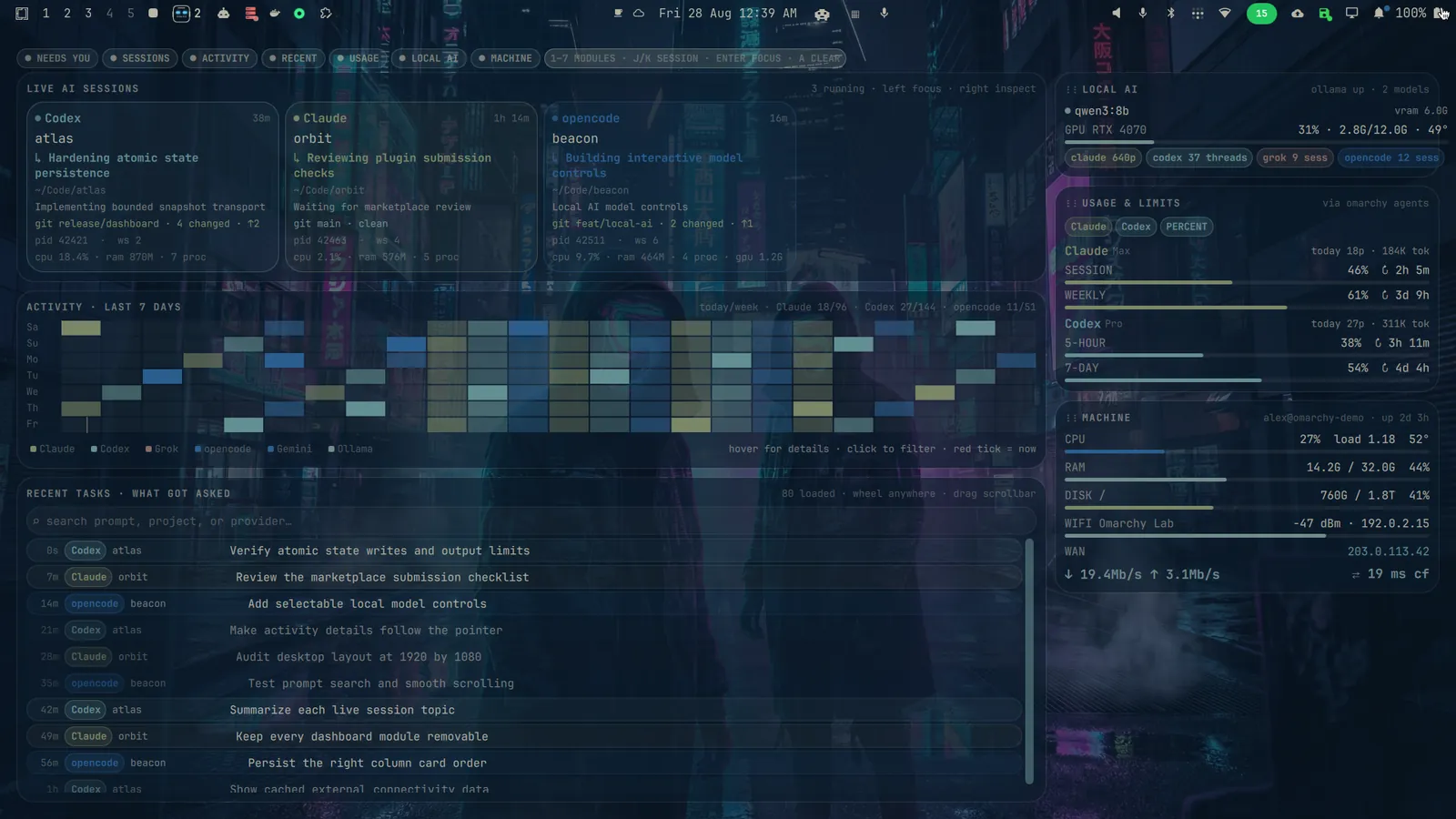
Features
-
Agents
Live AI sessions
One card per running agent: Claude Code, Codex, Cursor, Grok, Gemini, Hermes, opencode, aider, Ollama chats. They are detected straight from /proc, with no agent-side hooks and nothing to configure. The dot pulses while the agent is thinking.
One card per running agent, detected from /proc with nothing to configure. The dot pulses while the agent is thinking.
-
Limits
Usage and limits
Session (5-hour) and weekly (7-day) rate limit meters with time to reset, plus today's prompt count and token volume. Meters turn yellow past 60% and red past 85%. It reuses the cache from Omarchy's own omarchy.agents widget, so there are no extra logins and no API keys.
Session and weekly limit meters with time to reset. No extra logins and no API keys.
-
History
Activity and recent tasks
An hour by hour heatmap of the last 7 days of prompts across every provider. Below it, the newest prompts from all providers. Click a task from a running session to jump to its terminal.
A 7-day heatmap of prompts across every provider, and the newest tasks. Click a running one to jump to its terminal.
-
Machine
Machine stats
CPU, RAM, disk, Wi-Fi, WAN, live throughput, ping latency and battery. Any meter goes red when it is in real trouble.
CPU, RAM, disk, Wi-Fi, WAN, throughput, latency and battery. A meter goes red when it is in real trouble.
-
Remote hosts
Hermes hosts
A read-only card for remote Hermes agent hosts. Each row shows whether the host is connected, its current task, and any pending approvals. Rows dim after 5 minutes without fresh data and turn red after 30. Unreachable hosts are flagged. Nothing on the card can approve, deny or control a host.
A read-only card for remote Hermes hosts: connection status, current task, pending approvals. Stale rows dim, then turn red. Unreachable hosts are flagged.
-
Desktop
Follows your theme
There are no colors in the plugin. It reads your active Omarchy theme, so switching themes re-skins the desk in place. After you add the shortcuts from the README, SUPER + I hides the cards to show your plain wallpaper, and again to bring them back.
It reads your active Omarchy theme and re-skins when you switch. After setup, SUPER + I toggles the desk.
On GitHub
- 132 stars
- 24 forks
- 13 contributors
- MIT license
Star and contributor counts are from GitHub, October 28, 2026.
In the wild
I use the Infomarchy plugin from @NixFred to visualize my bots (and he PR'd my collapsed mode contribution ...)
Part of nixfred.com
Infomarchy is one of Fred Nix's projects. See the rest at nixfred.com